RabbitMQ Monitoring: Pushing Queue Metrics to Elasticsearch with Python script
Updated:
Monitoring RabbitMQ queues is critical for maintaining the health and performance of the RabbitMQ distributed system. This post is about a Python script that will collect the RabbitMQ queue metrics through it’s API and send them to an Elasticsearch in a data stream. I wrote the script so that I can keep the record of consumers nodes history for the queues.
Technologies I used to monitor.
RabbitMQ: The message broker providing the metrics via its Management API.
Python (requests, json, logging): For fetching, processing, and ingesting the data.
Elasticsearch (ES): The robust search and analytics engine used for storing and querying data.
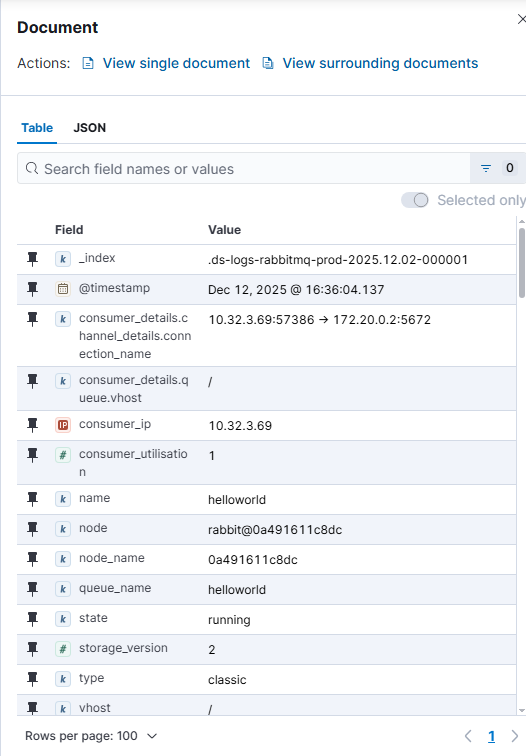
The process, orchestrated by the metrics_rabbitmq() function, begins by defining the target RabbitMQ Management Hosts and Elasticsearch Nodes. The script then iterates through each RabbitMQ host, first retrieving a list of all queues using the Management API’s /api/queues endpoint. Next, for every queue identified, it makes a subsequent call to the detailed queue endpoint (/api/queues/{vhost}/{queues}) querying every vhosts to fetch comprehensive metrics, including message counts, consumer information, and other metrics. This data is further processed by adding a standardized @timestamp, and adding user friendly field names node_name, queue_name and consumer_ip. Finally, the processed document is ingested into the Elasticsearch through Data Stream. To push the metrics, API key is used for the Elasticsearch authentication and basic authentication credentials to authenticate the RabbitMQ. They all are defined in the .env file.
Create a .env file in the project directory first.
ES_API_KEY="<your ES KEY>"
RABBIT_USER="admin"
RABBITT_PASS="pass"
main.yml file.
Output of the script:
2025-12-10 13:22:58 [INFO] Fetching queues from http://srv01.abc.com:15672
2025-12-10 13:22:58 [INFO] Successfully fetched 365 queues from http://srv01.abc.com:15672
2025-12-10 13:23:41 [INFO] Fetching queues from http://srv02.abc.com:15672
2025-12-10 13:23:41 [ERROR] Failed to fetch queues from http://srv02.abc.com:15672: 401 Client Error: Unauthorized for url: http://srv02.abc.com:15672/api/queues
2025-12-10 13:23:41 [INFO] Fetching queues from http://srv03.abc.com:15672
2025-12-10 13:23:41 [INFO] Successfully fetched 28 queues from http://srv03.abc.com:15672
Screenshot from the Kibana.

Leave a comment